

What happened
GitHub made agent skills and MCP support in Copilot code review generally available on July 29 for Pro, Pro+, Business, and Enterprise users, after testing both in public preview. A pull request is the page where a proposed code change sits before a team merges it. It’s also where Copilot leaves its automatic review comments. Both new features let that review pull in context beyond the code itself.
Agent skills work through a SKILL.md file you add to a skill folder inside .github/skills in your repo. That file teaches Copilot code review your team’s own internal tools and coding standards. Copilot then checks pull requests against rules specific to your codebase, not just generic best practices.
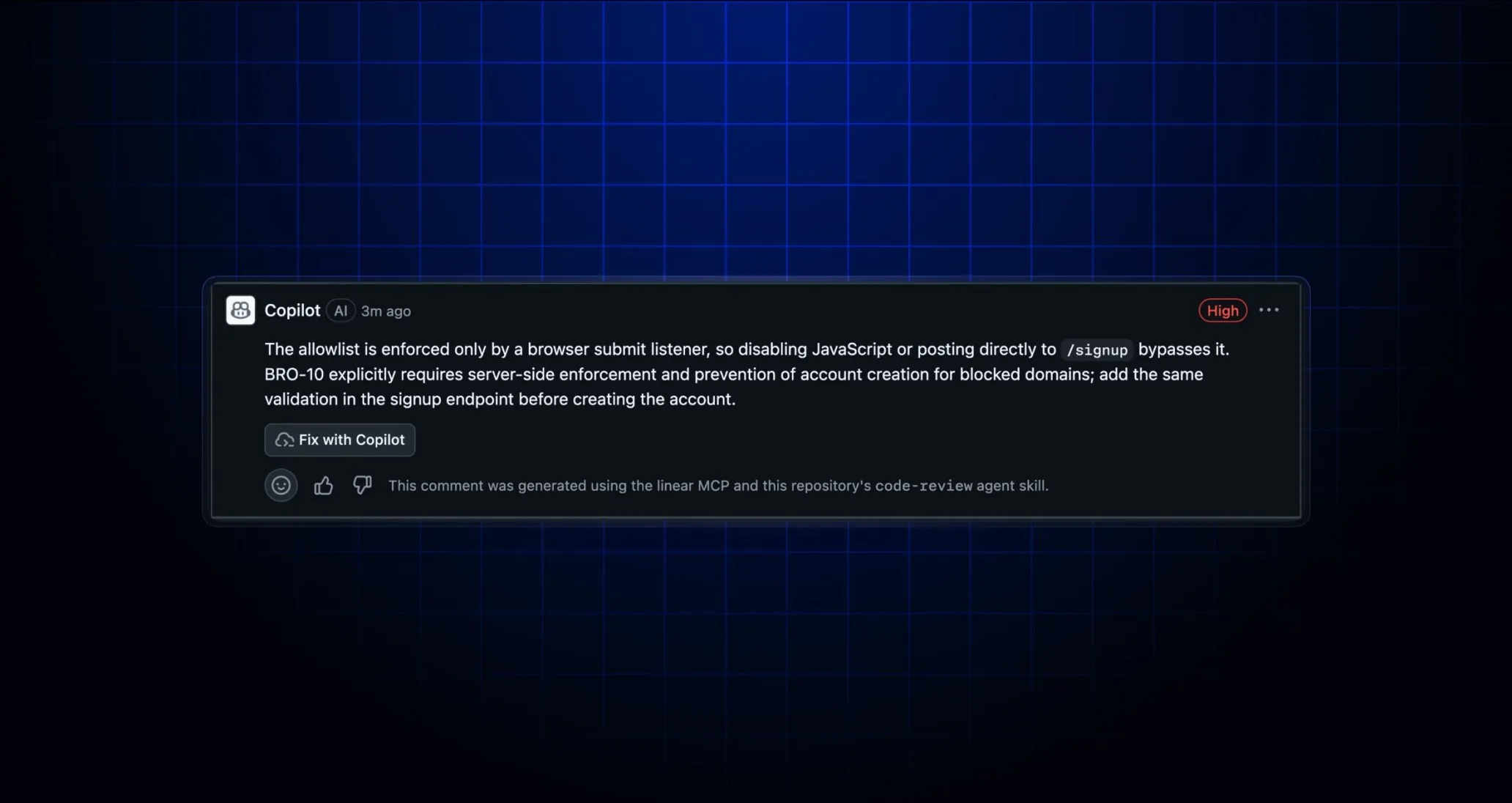
MCP is a standard that lets an AI tool connect to outside systems, like an issue tracker or a documentation site, and read from them during a task. With MCP support, Copilot code review can now pull that outside context into a review too. It can check a pull request against the actual ticket it’s meant to close, for example.
Why it matters
Two details matter more than “it’s available now.”
First, every MCP tool call Copilot code review makes is read-only. Copilot can look at your Jira ticket, your internal wiki, or your service catalog, but it can’t write back to any of them through a code review. That limits one kind of risk. It does not prevent information from appearing in review comments.
Read-only stops Copilot from changing anything in the connected system. It doesn’t stop Copilot from quoting what it read there in a comment on your pull request itself. A pull request has a different audience than the internal tool the content came from.
Say your MCP-connected tool holds something sensitive: an internal note, an unresolved security ticket. If Copilot’s review comment references it, that content is now visible to everyone who can see the pull request. On a public repo, or one with outside contributors, that audience is bigger than the internal tool it came from.
Second, GitHub says its own MCP server and a Playwright MCP server (a tool that automates a web browser) are turned on by default. Copilot code review calls out to those two automatically now, even if you never touched MCP settings yourself.
One addition softens this: review comments now carry attribution. Copilot labels when a comment came from a skill or from MCP context, so you can see where a comment’s information came from before you act on it.
Who should care
This matters if your team already uses Copilot code review and keeps internal documentation, a ticket tracker, or coding standards worth reflecting in reviews. A SKILL.md file or an MCP connection turns those into automatic review context, instead of something a reviewer has to remember to check by hand.
It also matters if you haven’t touched MCP settings at all. GitHub’s default-on servers mean review can use MCP tools even if you have not configured a separate connection.
It matters less if your repo is small, has no connected internal tools, and doesn’t need a coding-standards file. The default tools and attribution labels still deserve a check.
What builders should do next
Open a test pull request that touches something referenced in your MCP-connected tool. Use a Jira ticket or an internal doc with a placeholder note that reads sensitive but isn’t. Then check two things on the resulting review comment:
- Attribution: does Copilot correctly label the comment as coming from a skill or an MCP source, rather than from the code alone?
- Exposure: does the comment quote or restate that connected content in a way visible to people who shouldn’t see it? This matters most if your repo has outside collaborators or is public.
If a review comment exposes something it shouldn’t, disconnect that MCP server from Copilot code review, or scope what it can read. Read-only access to a system isn’t the same as safe-to-quote-in-public access to what’s inside it.
End of article